Showing posts with label Presonus Digital Mixer. Show all posts

Friday, December 5, 2014

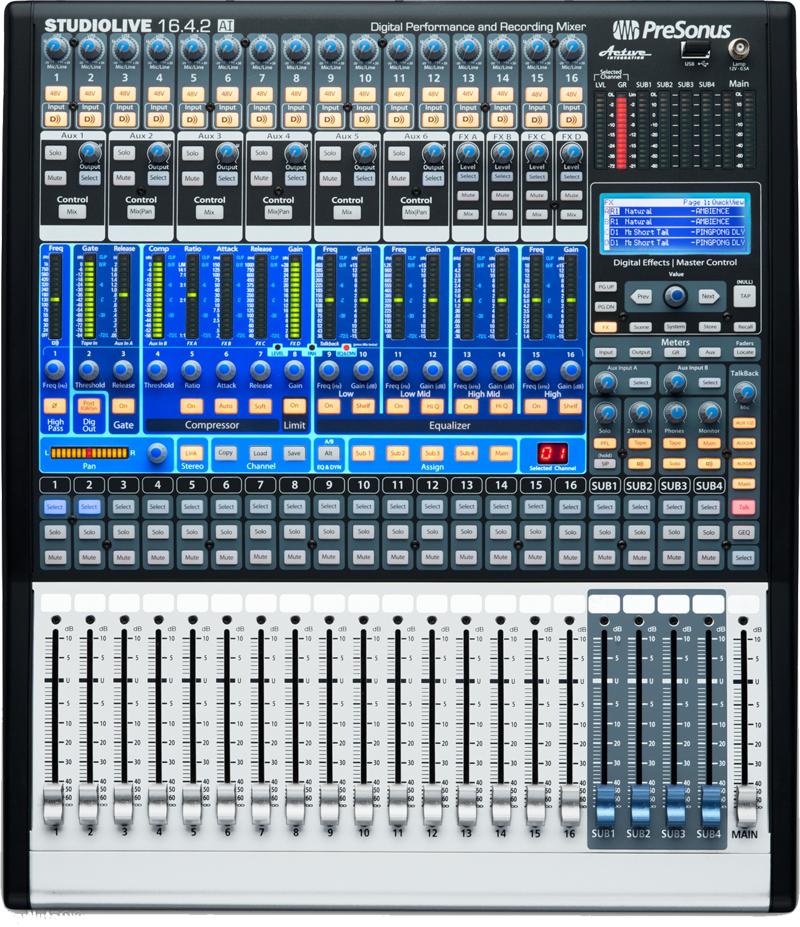
Presonus StudioLive SL16.4.2Ai

 
Price List Rp.32.418.000
Presonus StudioLive SL16.4.2Ai
Audio engineers sure are a demanding bunch. We want our mixers to be feature-filled, yet easy to use; expandable, yet compact; powerful, yet affordable. And naturally, we want the convenience of digital with the warmth of analog. The PreSonus StudioLive 16.4.2AI digital mixer meets the most discerning engineer's demands (and budget) with clear, warm mic preamps, an impressive array of top-notch digital effects, and a 32x18 FireWire I/O -- making the 16-channel StudioLive a formidable mixing console, whether in the recording studio or on the road.

Plenty Of Routing

Sixteen class-A, high-headroom XMAX preamps feed sixteen input channels for plenty of mixing flexibility. Full band setups with multiple singers are no problem with the StudioLive 16.4.2. To make mixing on the fly easier, assign your inputs to one of four subgroups to get single-fader control over all the drum mics, or all the backup singers, for example. 

Additionally, use 6 external auxiliary outputs to send discrete monitor mixes to different areas of the stage, or route them to your outboard effects rack. There's even a complete talkback section (with its own dedicated mic input) for easy communication with performers, whether live or in the studio. Need more than sixteen input channels? Simply daisy-chain a second StudioLive unit and get perfectly synced 32-channel mixing, thanks to the board's FireWire capabilities.

Leave Your Outboard Gear At Home

Two Fat Channel FX processors and four 32-bit effects processors are what make the StudioLive such a powerful -- and self-contained -- mixing solution. The intuitive Fat Channel design puts high-precision EQ, compression, gating and limiting on every channel. Simply press the select button above a channel's fader, and the Fat Channel display is populated with that input's settings, all laid out graphically before you. You'll be able to quickly and confidently make equalization and compression adjustments, and because all this processing is done internally, you don't have to rely on any external compressors, gates, or noise suppressors. 

Need a great snare drum sound fast? Easily pull up and tweak the onboard presets -- or save, copy, and paste your own settings. In addition to the Fat Channel processors on each channel, there's a full complement of aux-send effects, including studio-quality reverbs, echos, delays, choruses, and more, with the same 32-bit processing. 

The StudioLive 16.4.2 even sports a dedicated tap-tempo button for using time-based effects in live performances. You can even store and recall favorite effects "scenes" for each tune you do live. Now you can rock the same vocal delay live that worked so well in the studio. The PreSonus StudioLive 16.4.2AI could be the next "touring member" of your band.
 

32x18 FireWire I/O -- Capture Your Mixes
PreSonus has outfitted the StudioLive with impressive recording tools for both live and studio situations -- just like the name says. Hook the unit up to your Mac or PC and you get 32x18 audio recording over FireWire. Every input channel, every aux, and every subgroup can be routed to the FireWire inputs for impressive tracking flexibility. Best of all, the mixer ships with both Studio One Artist and Capture 2, two different live recording softwares. 

Connect the FireWire cable, load up the software on your computer, arm your tracks and hit record...it's that easy. Of course, you can also use it with all the major multitrack recording software, like Pro Tools, Cubase, Nuendo, Logic, etc. And for studio situations, you can add multiple channels by connecting additional FireWire gear for virtually limitless expandability. You can even use the StudioLive 16.4.2AI as a tape return mixer to add true analog summing to your digital sessions.

A digital mixer with onboard effects is a the perfect solution for gigging bands that want to record in their rehearsal studio. And if you're a live venue that's looking to offer recording capabilities to your artists, look no further. The powerful, affordable PreSonus StudioLive 16.4.2AI 16-Channel digital mixer/audio interface has arrived.
 
Features:
  • 16 mic/line inputs have high-headroom class-A XMAX preamplifiers with 80 dB of mic gain and +48V phantom power, each on their own channel strip with 100mm faders and access to Fat Channel functions
  • 4 subgroup buses, stereo/mono main outs, and 6 aux mixes with access to Fat Channel functions
  • Fat Channel functions include pan, stereo link, phase reverse, high-pass filter, 4-band semi-parametric EQ, gate, compressor, limiter, and output assign - with 50 Fat Channel factory presets for drums, bass, guitars, keyboards and vocals
  • Two FireWire ports; 32-in/18-out FireWire digital recording interface (32-bit/44.1 kHz and 48 kHz) with bundled Capture 2 recording software and Studio One Artist Digital Audio Workstation software for Mac and PC -- or record to any DAW with the FireWire interface
  • High-definition analog-to-digital converters with 118 dB dynamic range
  • Unlimited-headroom, 32-bit floating point digital mixing and effects processing
  • Lighted Solo and Mute buttons and 15-LED ladder metering plus clip LED
  • Talkback system with XLR input, output select and Talk button
  • Rugged steel chassis; military-grade, quick-touch buttons


Virtual StudioLive (Mac/Win) and StudioLive Remote (iPad)
PreSonus Virtual StudioLive-AI software for Mac and Windows provides bidirectional control of the StudioLive digital mixer. Now you can see and control the most-used mixer parameters onscreen, including channel, subgroup, aux send, and main levels, as well as Fat Channel, effects, and graphic EQ settings.

Control the mixer with a mouse or watch VSL update when you adjust the hardware. Drag Fat Channel presets onto all 16 channels in seconds. Mute or solo every channel with a sweep of the mouse. Apply a Scene to the whole mixer just by dragging it on VSL from a list you see at all times. Collect and trade Scenes with other StudioLive users.


To top it off, you can control VSL - and therefore, your StudioLive mixer - from an Apple iPad. With PreSonus StudioLive Remote for iPad (free from the Apple App Store), you can walk around the venue and tweak the mix, in real time, from any location, fixing monitor mixes from the stage and eliminating sonic problems on the spot.
  • Easy drag-and-drop workflow
  • Drag presets directly to channels
  • Drag parts of presets directly to components in the Fat Channel
  • Adjust the Fat Channel gate, compressor, and EQ plus the graphic EQ and effects
  • Quickly drop entire Scenes to the mixer to instantly load all channel, effects, and graphic EQ settings
  • Load effects quickly by simply dragging presets into the GUI
  • Use the mouse to quickly assign channels to multiple buses, mute, solo, etc.
  • Store and organize presets on your computer, then transfer them to your mixer for that night's gig
  • Create presets on the road, store them to the mixer, then drag them to your preset pool the next time you're connected to the computer
  • Reorder presets in mixer memory and in the software to best fit your workflow for each gig
  • Share presets with friends; drag presets out of the browser and email, IM, or disk-swap presets with other StudioLive owners
  • See all of the most-used parameters on the mixer at once
  • See the state of all Fat Channel settings at once
  • See all aux mixes at once
  • See the current effects and other parameter settings
  • View and graphically edit all parametric EQ and compression curves
  • View and graphically edit all graphic equalizer settings
  • Do time-stamped backups of the entire mixer
  • Remote control the mixer from an iPad using StudioLive Remote software.

Q-Mix Wireless Aux-Mix Control Software for iPhone and iPod touch
With QMix, you can enjoy wireless remote control of any PreSonus StudioLive mixer's aux sends from up to ten Apple iPhones or iPod Touches. Let performers create their monitor mixes from individual iPhones. With the Wheel of Me, you can select multiple "Me" channels and control their levels simultaneously. Requires a Mac or PC running PreSonus Virtual StudioLive.
  • Runs on an Apple iPhone or iPod touch with iOS 4 or higher
  • Provides wireless control over aux mixes in Virtual StudioLive and hence, over aux mixes in any StudioLive-series digital mixer
  • Portrait view shows Wheel of Me, where you can select multiple "Me" channels and control their levels simultaneously
  • Landscape view provides control of all aux-send levels and panning (for linked auxes)
  • Aux mixes can be named (up to 10 characters)
  • Control the auxes on any StudioLive mixer on the wireless network from one iPhone or iPod touch
  • Multiple iPhones and iPod touches can control the same StudioLive
  • Set permissions in VSL so each iPhone and iPod touch can control only one specific aux mix
  • Free from the Apple App Store

Thursday, November 21, 2013

PreSonus StudioLive 32.4.2AI Digital Recording Console

Price List Rp.64.628.000
PreSonus StudioLive 32.4.2AI Digital Recording Console 
The PreSonus StudioLive 32.4.2AI Digital Recording Console with Active Integration is designed for live sound reinforcement, live recording, and studio recording applications. The mixer is an integrated hardware and software system with dual digital Fat signal processing on every channel, recallable scene presets, virtual sound check, remote control using a PC, Mac, or iPad, remote monitor mixing using an iPhone or iPod Touch, and all the software you need for live mixing, recording, and distributing your music online.

The unit features 32 input channels with +48V phantom powered XLR XMAX microphone preamplifiers and bypass-able balanced 1/4" TRS line level inputs, a 48-In/34-Out FireWire s800 recording and playback interface with two FireWire ports, 14 auxiliary buses, 4 subgroups, a talkback button, and extensive LED metering. For outputs the mixer includes a balanced XLR mono output, a left and right pair of balanced stereo XLR main outputs, a left and right pair of balanced 1/4" TRS control room outputs, a left and right stereo pair of RCA connectors for Tape output, an SPDIF out, and three balanced 25-pin D-sub pre-insert direct outputs.

For effects, the mixer features 32-bit floating point processing with 4-band parametric EQs, eighteen 31-band graphic EQs, high pass filters, limiters, compressors, expander/gates with key listen and key filter, reverbs, and delays.

For mixing, each channel features a 100mm long-throw fader, military-grade quick touch buttons for toggling effects, and rotary encoders for controlling functions such as the attack, ratio, and release of the compressor, the panning position of a channel, and the frequency setting of the equalizers or filters.

The mixer comes with Active Integration Virtual StudioLive advanced librarian/editor control software for PC or Mac: the StudioLive remote control application for Apple iPad (free from Apple App Store), the QMix remote auxiliary mix application for iPhone or iPod Touch (free from Apple App Store), Capture integrated multi-track-recording software, and Studio One digital audio workstation including 6GB of loops, plug-ins, and virtual instrument sounds.

Active Integration
Synchronizes StudioLive hardware and software ecosystem of sessions and settings over a wired or wireless network with 32-bit floating point DSP to improve workflow in live performance, live recording, mixing, and digital distribution

Network Connectivity
Allows you to connect mixer directly to a router via the included USB Wi-Fi LAN adapter or into a network switch via Ethernet port for wireless Wi-Fi or wired control of the mixer

XMAX Preamplifier
Utilizes 30V power rails and discrete components in a class A circuit design to boost microphone signals by 400 times up to line level

Burr Brown A/D/A Conversion
Provides clean analog to digital and digital to analog conversion

Mixing Surface Quick Scenes
Provides dedicated buttons on the mixer for quickly switching between different scenes of signal processing settings

Mixing Surface Mute Groups
Provides 6 dedicated buttons on the mixer for muting and unmuting multiple channels and buses

OMAP L138 Processor
Provides 64 times the processing power and 10,000 times the RAM of previous StudioLive DSP

One to One Control
Enables direct control over the mixer without navigating layers of complicated submenus

Solo Modes
Allows latch solo for soloing multiple channels or buses at once, CR solo for patching solo bus to monitor bus, and radio solo for soloing one channel or bus at a time to speed up sound checks

Quick Null
Allows you to zero out any mixer parameter without nullifying the entire mix

Dual Fat Channel Signal Processing
Each Fat channel processor provides 4-band parametric EQ, compressor, gate with sidechain key filter, and limiter on all 24 input channels with ability to do A/B comparisons between the two processors

Fat Channel Categories
Organizes Fat channel signal processing settings into preset categories you can browse such as vocals, drums, etcCapture 2.1 Live-Recording Software with Active IntegrationProvides a digital multi-track hard-disk recording environment with 32-bit 96 kHz audio engine, stereo or multi-track workflow, and automated presets for recalling channel strips and auto-saving

Studio One Artist 2.6 DAW with Active Integration
Provides full featured DAW for recording, editing, and mixing your music with Active Integration of Capture session labels and StudioLive mixer scenes and settings. The start page for Studio One now includes a Nimbit and Soundcloud dashboard, complete with fan and sales statistics

Nimbit Dashboard
Enables self publishing and paid distribution of music through Nimbit.com, your own website, and integrated social networking sites such as Facebook and Twitter. Nimbit allows you to sell tracks, tickets, and merchandise direct to fans, accept donations, gather email addresses, and overview stats about who is interested in your content

QMix-AI iPhone/iPod Touch Aux Mix App
Enables control of individual auxiliary artist mixes using an iPhone or iPod Touch with separate level controls for each element in the mix or a "Wheel of Me only" control for raising the level of one element while reducing the levels of all others. Active Integration enables direct control over mixes without having to route through a computer

StudioLive Remote-AI iPad App
Enables remote control of the entire mixer using a PC, Mac, or iPad so you can adjust channel processing, gating, compression, equalization, panning, effects, and channel levels from any position within the studio or venue. Active Integration enables direct control over the mixer using an iPad through a router without having to connect to a computer

Virtual StudioLive-AI
Enables universal and secure drag and drop control over the mixer using a PC or Mac for channels, subgroups, auxiliary sends, main levels, mutes, solos, EQ, and more. Active Integration enables synchronization of channel strip settings and labels between Virtual StudioLive software and StudioLive mixer

Virtual Sound Check
Allows you to pull up and playback a previously recorded rehearsal or performance so you can adjust the mixer to accommodate the acoustic characteristics of a room without needing the band to be present for the sound check

Smaart Measurement Technology
Provides real time analysis, time-frequency spectrograph equalization, and time alignment to correct for the acoustic characteristics of your room

Expandable
Enables the replacement of the stock Ethernet/Firewire card with a Thunderbolt, an AVB, or a Dante Audio over Ethernet card
PreSonus StudioLive 32.4.2AI 32-channel Digital Mixer Features:
  • 32 x Class A XMAX microphone preamplifiers individual phantom power deliver studio-quality sound for any microphones
  • USB wireless LAN included for direct wireless remote control of laptops, iPad, or iPhone/iPod touch — no computer connection or separate network needed!
  • 4 x onboard digital effects processors let you add depth and dimension to your mixes
  • Integrated FireWire 800 interface makes live recording easy 
  • 2 x Fat Channel processors per channel provide highpass filter, full-featured gate and compressor, limiter, 4-band parametric EQ, and the ability to A/B two completely different setups
  • Smaart Measurement Technology integration lets you quickly tune your system to any room
  • Direct integration with PreSonus's Capture 2.x multitrack recorder and Studio One 2.x DAW makes music production seamless
  • Optional Thunderbolt, AVB, and Dante cards provide easy integration into advanced recording and production setups
  • An exhaustive software suite including Studio One 2 Artist and Capture 2 included
Specification:

Microphone Preamps (XLR Balanced) 
Type 
XLR Female, Balanced 
Frequency Response to Direct Output 
20 Hz to 40 kHz ±0.5 dBu 
Frequency Response to Main Output 
20 Hz to 20 kHz ±0.5 dBu
Input Impedance (Balanced) 
1 kΩ 
THD to Direct Output 
< 0.007%, +4 dBu, 20-20 kHz, unity gain, unwtd 
THD to Main Output 
<0.005%, +4 dBu, 20-20 kHz, unity gain, unwtd 
EIN to Direct Output 
+125 dB unwtd, +130 dB A-wtd 
S/N Ratio to Direct Output 
105 dB 
S/N Ratio to Main Output 
94 dB
Common Mode Rejection Ratio 
65 dB 
Gain Control Range 
-15 dB to +65 dB (± 1 dB) 
Maximum Input Level (unity gain) 
+22 dBu 
Phantom Power 
+48 VDC 
Line Inputs 
Type 
¼" TRS Female, balanced mono 
Frequency Response to Direct Outputs 
10-40 kHz, 0 / -0.5 dBu 
Frequency Response to Main Outputs 
20-20 kHz, ±0.5 dBu 
Input Impedance 
10 kΩ 
THD to Direct Output 
<0.007%, +4 dBu, 20-20 kHz, unity gain, unwtd 
THD to Main Output 
<0.005%, +4 dBu, 20-20 kHz, unity gain, unwtd 
S/N Ratio to Direct Output 
105 dB 
S/N Ratio to Main Output 
94 dB 
Gain Control Range (±1 dB) 
-20 dB to +20 dB 
Maximum Input level (unity gain) 
+22 dBu 
Tape Inputs 
Type 
RCA Female, unbalanced (stereo pair)
Maximum Input Level 
+22 dBu 
Auxiliary Inputs 
Type 
¼" TRS Female, balanced (2 stereo pairs)
Maximum Input Level 
+22 dBu 
Main Outputs 
Type 
Male, balanced (stereo pair); ¼" TRS Female, balanced (stereo pair); XLR Male, balanced (mono) 
Rated Output Level 
+24 dBu 
Output Impedance 
100Ω 
Aux Outputs 
Type 
¼" TRS Female, balanced (mono) 
Rated Output Level 
+18 dBu 
Output Impedance 
100Ω 
Subgroup Outputs 
Type 
¼" TRS Female, balanced (mono) 
Rated Output Level 
+18 dBu 
Output Impedance 
100Ω 
Tape Outputs 
Type 
RCA Female, unbalanced (stereo pair) 
Rated Output Level 
+18 dBu 
Output Impedance 
100Ω 
Control Room Outputs 
Type 
¼" TRS Female, balanced (stereo pair) 
Rated Output Level 
+18 dBu 
Output Impedance 
100Ω 
System Crosstalk 
Input to Output (Ref = +4 dBu, 20 Hz-20 kHz, unwtd) 
-90 dBu
Adjacent Channels (Ref = +4 dBu, 20 Hz-20 kHz, unwtd) 
-87 dBu 
Noise Gate / Expander
Threshold Range 
-84 dB to 0 dB 
Attack Time 
0.02s to 500 ms / 0.5 ms 
Release Time 
0.05s to 2s 
Expander Attenuation Range 
2:1 
Gate Attenuation Range 
-84 dB to 0 dB / ∞ 
Key Listen Filter 
2nd-order resonant bandpass; Q=0.7; OFF, 40 Hz-16 kHz 
Limiter 
Threshold 
-56 dB to 0 dB / -28 dBFS 
Ratio 
∞:1 
Attack 
20 ms 
Hold 
10 ms 
Release 
20 ms 
Compressor 
Threshold Range 
-56 dB to 0 dB 
Ratio 
1:1 to 14:1 
Attack Time 
0.2 ms to 150 ms 
Release Time 
40 ms to 1000 ms 
Auto Attack and Release 
Attack = 10 ms, Release = 150 ms 
Curve Types 
hard and soft knee
 Parametric EQ 
Type 
2nd-order shelving filter (Q = 0.55) 
Low (Lowpass or Bandpass) 
36 to 465 Hz, ±15 dB 
Low Mid 
90 Hz to 1.2 kHz, ±15 dB 
High Mid 
380 Hz to 5 kHz, ±15 dB 
High (Highpass or Bandpass) 
1.4 kHz to 18 kHz, ±15 dB 
Q 
0.1 to 4 / 16.4.2AI*: Low Q= 0.55, Hi Q=2.0 
Graphic EQ 
31-Band 1/3rd Octave Controls 
Curve-fitting algorithm 
Gain/Attenuation 
±15 dB 
Digital Audio 
ADC Dynamic Range (A-wtd, 48 kHz) 
118 dB 
DAC Dynamic Range (A-wtd, 48 kHz) 
118 dB 
FireWire 
s800, 800 Mb/s 
Internal Processing 
32-bit, floating point 
Sampling Rate 
44.1, 48 kHz 
A/D/A Bit Depth 
24 
Reference Level for 0 dBFS 
+18 dBu 
Clock 
Jitter 
<20 ps RMS (20 Hz - 20 kHz)
Jitter Attenuation 
>60 dB (1 ns in ≈ 1 ps out) 
Power/Environmental 
Connector 
IEC 
Input-Voltage Range 
100 to 230V, 50-60 Hz 
Power Requirements 
200W 
Temperature Range
 0˚ to 40˚ Celsius / 32˚ to 104˚ Fahrenheit 
Physical (32.4.2AI / 24.42AI /16.4.2AI) 
Length 
21.31" (54.13 cm) / 21.31" (54.13 cm) / 22.35" (58.6 cm) 
Width (chassis only) 
31.58" (80.21 cm) / 25.19" (63.98 cm) / 17.22" (43.74 cm) 
Maximum Height 
7.02" (17.82 cm) / 7.02" (17.82 cm) / 6.9" (17.53 cm) 
Weight 
50 lbs. (22.68 kg) / 30 lbs. (13.6 kg) / 23 lbs. (10.43 kg) 
*Fully variable through VSL-AI and SL Remote-AI. 
Please see complete mechanical drawings when building a custom rack, desk, or case.
As a commitment to constant improvement, PreSonus Audio Electronics, Inc., reserves the right to change any specification stated herein, at any time, without notification. 

Monday, April 18, 2011

Presonus StudioLIVE 24.4.2

Price List Rp.42.525.000
Presonus Digital Mixer StudioLIVE 24.4.2
See it. Touch it. Change it: the ease of analog meets the power of digital.
When we designed StudioLive, one of our primary goals was to provide a familiar interface that would keep all critical controls visible and accessible—not buried inside multiple menus.
Sit down at a StudioLive 24.4.2, and you see real hardware Mute and Solo buttons, trim controls, and clearly labeled, individual knobs for the parametric EQ and dynamics processing. The master section—complete with Talkback, Monitor, Cue, and a choice of headphone sources—looks just like the master section on an analog board but with far more power and flexibility. Aux sends have their own controls. Every channel has a big, bright meter display.
Bottom line: if you've ever used an analog mixer, you'll be right at home with a StudioLive 24.4.2. And even if you've never used a mixer before, you'll quickly be able to create quality mixes and recordings.

New Virtual StudioLive™ (Mac/Win) and StudioLive Remote (iPad®) let you remote-control StudioLive 16.0.2, 16.4.2 and 24.4.2.

You'll never go back to an old-school analog mixer once you've used StudioLive™. With its incredible signal-processing power on every channel, easy store and recall of every setting, and the ability to record it all with just two mouse clicks, you'll get spoiled fast! Easier to use, better sounding, and flawlessly integrated with state-of-the-art software, it delivers the most creative environment possible for both live performance and studio music production.
But StudioLive is not simply a mixer, it's a rapidly growing family of state-of-the-art, integrated hardware-software mixing and recording systems that deliver the features you need for live sound, live recording, and studio recording. 
The StudioLive 24.4.2 is a fine choice for those who want to mix small to medium-sized shows and worship services, and it's a great choice for club systems, corporate applications, and educational institutions. And it's the perfect hardware core for a project studio.
Here, in one device, are high-headroom XMAX™ microphone preamplifiers, a built-in FireWire recording and playback interface, more than 90 signal processors, a big library of DSP effects, 10 aux buses, 4 subgroups, extensive LED metering, mixer save and recall, channel-strip save/recall/copy/paste, talkback, and more. Yet despite its many controls and features, it's compact and easy to transport.
Build live mixes that glisten with clarity and detail—then record and enhance the performance with the power of StudioLive 24.4.2. Get creative in the studio. Build mixes, loops, sound effects, and more, then bring them out to your show and mix them with the live performance. Process channels using your favorite plug-ins and completely automate your entire performance. StudioLive 24.4.2 revolutionizes music production, opening endless creative possibilities.
Which StudioLive is Best for You?
Your mixing and recording needs aren't necessarily exactly the same as everyone else's. That's why we created a StudioLive family of digital mixers, starting with the StudioLive 16.4.2 and the StudioLive 24.4.2.
Why choose the StudioLive 24.4.2 rather than the StudioLive 16.4.2? Let's say you want more than 16 channels but want to keep your system compact. Perhaps the acts and events you mix require lots of monitor mixes, so you need more than the six auxiliary buses in the 16.4.2, and you want fully parametric EQ, rather than semi-parametric. You could use an enhanced gate with Key Listen and Key Filter features, and a Threshold control on the limiter would be handy. A stereo graphic EQ on the mains is mandatory but you also want graphic EQ on the subgroups and auxes at times—four dual-mono, 31-band graphic EQs would do the job nicely. No problem! You get all of these enhancements and more with the 24-channel, 10-aux, StudioLive 24.4.2.
If your needs and budget are more modest, you might want to consider the StudioLive 16.0.2. The StudioLive 16.0.2 provides fewer channels, mic preamps, aux buses, FireWire streams, graphic EQs, and meters than the StudioLive 24.4.2, and it does not have subgroups, digital outs and analog direct outs. Its faders are 60 mm instead of 100 mm, and you can't daisy-chain two 16.0.2s to create a larger system. And the StudioLive 16.0.2's Fat Channel is less elaborate than the 24.4.2 Fat Channel. However, the StudioLive 16.0.2 is much lighter and more compact than the 24.4.2, it's considerably less expensive, and it has a very cool feature that the larger StudioLives don't offer: MIDI control over main output level, effects levels and routing, and Scene change.
A gigantic console in a small package thanks to the Fat Channel.
If StudioLive were an analog console, it would have 4-foot-long channel strips packed with knobs and buttons or it would require a massive outboard rack of expensive signal processors! That's because each channel has its own studio-grade compressor, limiter, gate, 4-band parametric equalizer, and high-pass filter. In all, we've packed 43 compressors, 43 limiters, 43 gates, 24 high-pass filters, and more, into one remarkable Fat Channel.
Engaged by pressing any Select button, the StudioLive 24.4.2's Fat Channel features extensive EQ and dynamics for every input channel, every aux output (including the two internal FX buses), every subgroup output, and the main outputs.
To let you get the most from all of this processing power without descending into menu purgatory, we designed the Fat Channel with clearly labeled physical knobs; an ingenious, multi-function, 16-ladder LED display; an in-your-face Selected Channel display; and even a separate horizontal pan display. It's easy to instantly access any function and get clear, visible feedback.
Not just effects. Effects you'd expect from a $600 stand-alone processor.
You get two programmable, 32-bit, stereo DSP effects engines, loaded with 50 reverbs, delays, and time-based effects that you can really use. The reverbs are so rich and detailed that you feel like you're there. Delays are precise. Slap echo sounds like old-school tape effects. All 50 effects have easy-to-use parameter adjustment, tap tempo, store, recall, and Scene selection for ultimate creative flexibility.
The StudioLive 24.4.2's 4 dual, 31-band graphic equalizers can be applied to the main, subgroup, and aux outputs so you can compensate for room acoustics, speaker response, and much more.
All of these features add up to a lot of settings to remember and reset at every performance. That's where the power of digital comes in: StudioLive lets you save all of your digital settings for quick setup and recall. Save Scenes that include every setting on the mixer or save just the Fat Channel settings. Copy-and-paste settings across multiple channels. Save individual DSP effects for ultimate ease, speed, and control.
This means that for fixed applications like clubs, churches, and auditoriums, you can always count on the same sound and can fine-tune Scenes for different songs and call them up instantly. And it lets rank amateur volunteers successfully operate the StudioLive 24.4.2.
We've included a whole library of individual channel settings as starting points for optimizing the sound of instruments, vocals, and spoken word. An AutoStore feature regularly saves your current settings in case the power fails.
Recording made easy.
If you have a computer with 6-pin FireWire, you have a 26-track digital recorder instantly ready to capture your gig, church service, or presentation. Just two mouse clicks engages Capture™ recording software. Studio One Artist™ digital audio workstation lets you edit and enhance to your heart's content.
StudioLive 24.4.2 features a tightly integrated FireWire interface that delivers up to 32 channels of recording and up to 26 channels of simultaneous playback. Each FireWire recording channel can be set to record either pre- or post-Fat Channel signal processing, delivering total flexibility and power.
Because StudioLive 24.4.2 can so easily return FireWire playback channels from your computer, you can pull off nifty tricks. You can soundcheck your band and fine-tune the P.A. in a new venue, even when the band's not there yet. Or create backing tracks at your studio and seamlessly blend them with live performances.
Inside, it's pure PreSonus.
Ease of use and powerful features only count if the sound quality is equally impressive. After all, it really comes down to how good those microphone preamps are, how clean the signal path is, and how well the algorithms perform.
That's why you should choose a digital mixer made by PreSonus, a company already famous for its analog mic preamps, pristine digital interfaces, and well-regarded signal processors.
XMAX™ Class A preamplifiers deliver more headroom, deeper lows, smoother highs, and a richer overall sound than the preamps found in competing mixers. Ultra-high-headroom, 32-bit floating-point processing is used for all digital mixing. All analog inputs and outputs use the highest quality digital converters available. Synchronization to your computer is stable and robust, thanks to JetPLL™ synchronization technology, resulting in great stereo separation and clear, transparent audio.
StudioLive expands with your input needs.
Need more than 24 channels for mixing live shows and don't need to record? Daisy-chain two StudioLive 24.4.2s via their FireWire ports to get up to 48 input channels and 8 submix buses. If you need more than 24 channels for recording, and you don't need a full channel strip for the additional inputs, you can daisy-chain a StudioLive 24.4.2 with a PreSonus FireStudio Project, FireStudio Tube, or FireStudio Mobile interface. It could not be simpler.
You've read the book. Now see the movies.
We've provided plenty of written material about StudioLive. In addition, our Web site hosts a whole series of instructional videos showing StudioLive mixers in church, club, and project-studio applications. Video blogs go into detail about various powerful StudioLive features. And we regularly add new videos.
Reading about the StudioLive 24.4.2 is a good start but nothing beats actually getting your hands on one, so visit your nearest PreSonus dealer today. You'll see what we mean about intuitive ease-of-use. You'll hear what we mean about Class A preamps, rich DSP effects, and overall sound quality. And when you have seen and heard it for yourself, you'll understand why your new mixer should be a StudioLive.
Features:
  • 24 mic/line inputs with high-headroom Class A XMAX™ mic preamplifiers
  • 4 subgroups
  • Stereo/mono main out
  • 10 auxiliary mixes
  • 32-in/26-out FireWire digital recording ­interface (24-bit/44.1 kHz and 48 kHz)
  • Studio One Artist Digital Audio Workstation software for Mac™ and PC
  • Capture™ 1.1 recording software for Mac™ and PC
  • Direct recording interface compatible with Logic®, Nuendo, Cubase, Sonar™, Digital Performer™, Ableton™ Live, and more
  • 24 channel strips
  • Trim control with –20 to +20 dBV line/-15 to +65 dBu mic gain range (80dB!)
  • +48V phantom power switch for condenser microphones
  • FireWire Input Select
  • 100 mm precision faders
  • Lighted Solo and Mute buttons
  • Access to Fat Channel functions
  • 15-LED ladder metering + clip LED
  • Analog ¼" insert (rear panel)
  • 4 subgroup buses, each with:
    • Solo
    • Mute
    • Access to Fat Channel functions (except high-pass filter and phase reverse)
  • 10 aux sends, each with
    • Solo
    • Pre/post-fader send
    • Output-level control
    • Access to Fat Channel functions (except phase reverse)
    • Mix and Mix/Pan Fat Channel metering
    • Available sources:  24 input channels, Aux A and B, Tape Input, Talkback
  • 2 internal effects sends, each with:
    • Mute
    • Pre/post-fader send
    • Output-level control
    • Access to Fat Channel (except phase reverse)
    • Effects-send Select for Fat Channel metering
    • Mix button for aux-bus mixing and Fat Channel metering
  • Master Section
    • Aux Input A and B
    • Level Control and Select (Fat Channel ­metering) switch
    • Access to all Fat Channel functions (except phase reverse)
    • Talkback System
      • Mic Level control
      • Output Select ( Aux 1-2, 3-6, 7-10, Main)
      • Talk button
      • Rear-panel XLR mic input with level control and continuous 48V phantom power
    • 2 Track In
      • Level control
      • Tape Input to Mains button
      • FireWire source on/off
    • Solo Bus
      • Cue Mix volume control
      • PFL/AFL and Solo In Place (SIP) buttons
    • Monitor Bus
      • Headphone-output level control
      • Control-room monitor-level control
      • Solo Bus to Monitor button
      • Tape Input to Monitor button
      • Main L/R FireWire Return to Monitor button
      • Main Mix to Monitor button
  • Fat Channel with rotary encoders:
    • Pan with dedicated 15-LED display
    • Stereo link for input channels, aux buses, and subgroups
    • Phase reverse (main channels only)
    • High-pass filter: 6 dB/oct., sweepable from Off to 1 kHz (main channels and aux’s only)
    • 4-band fully parametric equalizer
      • Low EQ: sweepable from 36 Hz to 465 Hz, ±15 dB, switchable shelf or peaking
      • Low Mid EQ: sweepable from 90 Hz to 1.2 kHz, ±15 dB, variable Q 0.1 to 4.0
      • High Mid EQ: sweepable from 380 Hz to 5 kHz, ±15 dB, variable Q 0.1 to 4.0
      • High EQ: sweepable from 1.4 kHz to 18 kHz, ±15 dB, switchable shelf or peaking
      • Master EQ On/Off button
    • Gate: Threshold: 0 to –84 dB, Attack: 0.02 to 500 ms, Release: 0.05 to 2 sec, Bandpass Key Filter: 40 Hz to 16 kHz, second-order resonant bandpass filter Q (0.7) with Key Listen function
    • Compressor: Threshold,-56 to 0 dB; Ratio 1:1 to 14:1, LIM=∞:1; Attack 0.2 to 150 ms; Release 2.5 to 900 ms; Makeup Gain 0 to 28 dB; Soft Knee switch; Auto Mode with 10 ms Attack and 150 ms Release
    • Limiter: variable Threshold -28 dBfs to 0, ∞:1 Ratio
    • Output Assign: 4 subgroups and main with post-EQ/post-dynamics option
    • All settings can be copied among channels and saved as user presets.
    • 50 channel-strip presets for drums, bass, guitars, keyboards, and vocals
  • 2 internal digital effects-processors, each with 50 customizable reverb and delay presets
    • 31-band graphic equalizers
      • Assignable in four stereo pairs
      • Mono or stereo operation
      • Main outputs, aux outputs, subgroup outputs
    • Scene Store and Recall
    • Global Scene Storage: all current StudioLive settings
      • Up to 80 at a time
    • Automatic Global AutoStore
    • Individual channel-strip Scene storage
      • Up to 48 at a time, plus…
      • 50 factory presets for instruments and vocal
    • Copy and Paste between channels
    • Customizable naming (for example, “Saturday Gig” or “Main Worship Service”)
    • Lockout mode to keep inspired amateurs from changing your settings
  • Metering/Displays
    • 24 x 16- LED Fat Channel matrix:
      • Pre-dynamics/pre-fader input
      • Post-dynamics/post-fader output
      • Gain reduction
      • Aux 1-10 and EFX A/B output
      • Fader-position recall
    • 8 x 15-LED main meter bank
      • Selected channel level
      • Selected channel gain reduction
      • Sub buses 1 to 4
      • Main stereo outputs
    • 15-LED horizontal Pan/Balance display
    • 64 x 194 LCD matrix
      • Effects parameters
      • Scene creation, storage, and recall
      • System menus
    • 2-digit Channel Selected display
  • Input/Output
    • 24 main inputs, each with XLR mic, ¼" line, and ¼" inserts
    • 2 ¼" stereo (L/R) aux inputs
    • 1 XLR talkback-mic input with phantom power and level control
    • Unbalanced RCA stereo (L/R) tape inputs and outputs
    • XLR stereo (L/R) main outputs with level control
    • ¼" stereo (L/R) main outputs
    • XLR mono output with level control
    • ¼" stereo (L/R) control-room outputs
    • ¼" Headphone output
    • 4 ¼" subgroup outputs
    • 10  ¼" aux outputs
    • 24 pre-insert, balanced direct outputs, Ch. 1-8, 9-16, 17-24 (DB25 sockets) S/PDIF digital out
    • 2 FireWire 400 ports
  • Digitalia
    • High-definition analog-to-digital converters (118 dB dynamic range)
    • Unlimited-headroom, 32-bit floating point, digital mixing and effects processing
    • Internal sample frequency 44.1 kHz and 48 kHz
  • Physical
    • Rugged, non-flex steel chassis
    • 100 mm long-throw faders
    • Military-grade, quick-touch buttons
    • BNC 12V lamp socket
    • Optional dust covers available

Related Posts Plugin for WordPress, Blogger...
Web Informer Button